Apple’s iOS 27 update brings new features, interface changes, and improvements to the iPhone experience.
Apple’s latest major iPhone software update is iOS 27, released on September 16. The update introduces a major Siri overhaul, new customization options, improvements to built-in apps, and additional Apple Intelligence features.
iOS 27: What’s New?
A New Siri Experience With Apple Intelligence
Siri receives one of the biggest updates in iOS 27. Apple’s new Siri AI is designed to understand context more effectively, respond to follow-up questions, and work across apps to help users complete tasks.
The update also introduces a standalone Siri app which you can use to save and sync conversations across supported devices.
The new Siri AI is being introduced in beta, and availability depends on the iPhone model, language, and region.
If you have compatible devices, you may need to join a waitlist through Settings before accessing the feature.
More Control Over the Liquid Glass Design
iOS 27 continues Apple’s Liquid Glass design language, introduced with iOS 26.
The latest update adds an opacity slider which you can use to adjust the transparency of interface elements.
Apple has also updated app icons, introduced larger widgets, and refined the overall appearance of the operating system.
These changes give you more control over the interface’s look while retaining the visual style introduced in the previous major release.
New AI-Powered Photo Editing Tools
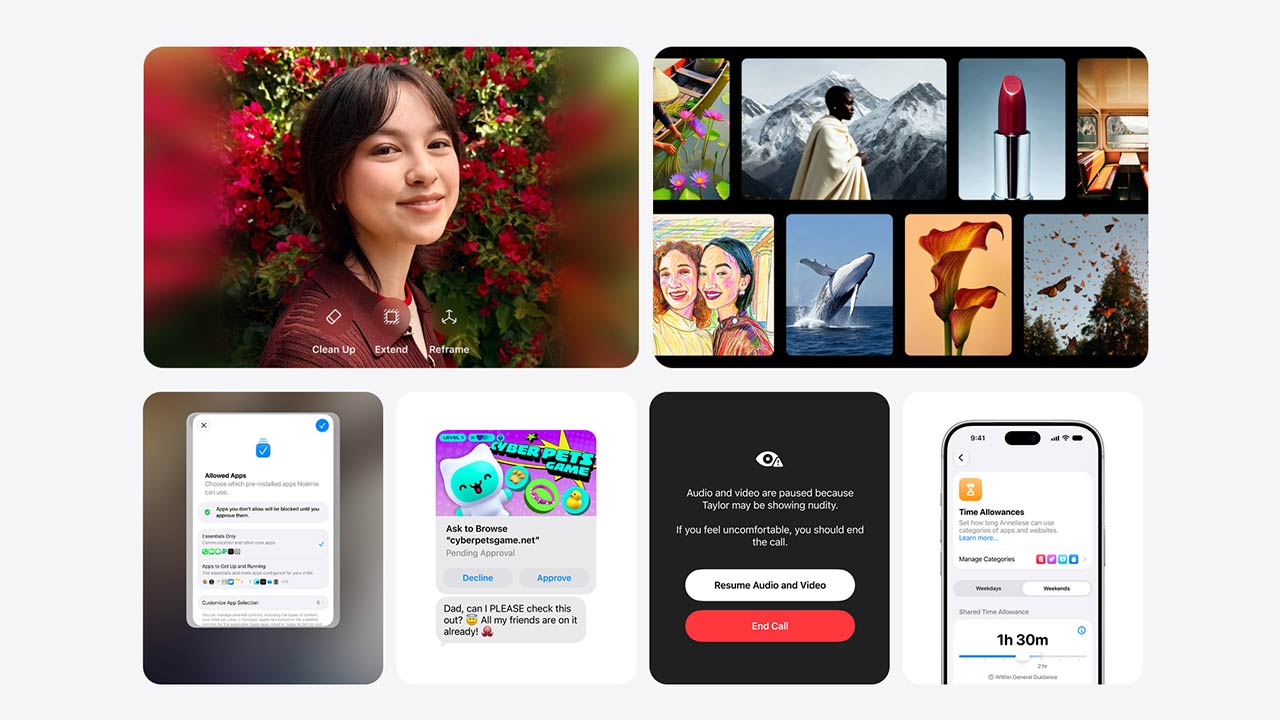
The Photos app receives new editing capabilities powered by Apple Intelligence.
The Reframe feature can adjust an image’s composition, and Extend helps expand images beyond their original frame. Clean Up is also available for removing unwanted elements from photos.
These tools are made to make everyday photo editing easier without requiring you to rely on dedicated third-party editing applications.
Shortcuts Gets Smarter
The Shortcuts app now supports natural-language commands, So, it easier to create and customize automations.
Instead of manually configuring every action, you can describe what you want a shortcut to do and use Apple’s AI capabilities to assist with the process.
This is useful if you regularly automate tasks involving apps, reminders, and other iPhone functions.
Improved Volume Controls
One of the smaller but useful changes in iOS 27 is the introduction of independent volume controls for different system sounds.
You can adjust alarm volume separately from other audio settings, giving you more control over how your iPhone behaves throughout the day.
More Changes Across Built-In Apps
Apple has also introduced several additional improvements across the iOS experience. These include enhancements to Camera, Safari, Messages, and other system applications.
The Camera app gains new capabilities involving Visual Intelligence, while Safari receives features designed to help you track product prices.
Messages also receives additional improvements, including enhanced communication features for conversations with Android users.
iOS 27 Compatible iPhones
Apple’s iOS 27 update supports iPhone 11 and newer models, according to the reported compatibility details.
However, not every iPhone receives every Apple Intelligence feature. Advanced Siri AI capabilities are restricted to supported newer devices.
You can check your iPhone’s compatibility and available features by opening Settings, selecting General, and then Software Update.
How to Download iOS 27
To install iOS 27, open the Settings app on your iPhone and go to General > Software Update. If the update is available for your device, you can select Download and Install and follow the on-screen instructions.
It is recommended to back up important data and connect the iPhone to Wi-Fi before starting a major software update.
iOS 27 focuses on making the iPhone more intelligent and customizable. The new Siri AI experience is the headline feature, while the Liquid Glass controls, smarter Shortcuts, photo editing tools, and smaller system improvements add more flexibility to everyday use.
The full benefit of the update will depend on the iPhone model and the availability of Apple’s AI features in your region.