Gaming mice are important for you if you are a gamer because they can improve your performance in games. A high-DPI mouse allows for more accurate and faster movements, which can give you a competitive advantage in games that require quick reflexes.
Customizable buttons allow you to assign various actions to buttons, giving quick access to specific game functions. A comfortable and ergonomic design can also prevent hand fatigue during long gaming sessions.
If you are looking to purchase a good Gaming mouse, then look no further, this guide will help you pick out the best gaming Mouse based on your budget and gaming style. Don’t worry, we have looked at gaming mouse from some of the most popular manufacturers like Logitech, Razer, SteelSeries, Asus, and more, before making this list.
Which Mouse is Best for Gaming?
The best gaming mouse depends on several different factors, below you can find a few of them.
- DPI (Dots Per Inch): This is the measure of the sensitivity of the mouse. A higher DPI means the mouse is more sensitive, and you’ll need to move it less to cover more screen area.
- Polling Rate: The frequency at which the mouse sends its position to your computer. A higher polling rate means a faster response time.
- Ergonomics: Comfortable grip and button placement are essential for extended gaming sessions.
- Customizability: Many gaming mice have programmable buttons and software that allows you to customize the settings.
- Durability: Gaming mice undergo rigorous usage, so you need to consider the quality of construction and the warranty.
- Price: Gaming mice vary in price, and you should consider your budget.
- Reviews: Read reviews from other gamers to understand their experience with the mouse.
Overall, a good gaming mouse provides a comfortable and precise grip, is customizable to your needs, has a high DPI and polling rate, is durable and reliable, and is within your budget. Below you find some of the best gaming mice from popular brands like Logitech, Razer, SteelSeries, Corsair, and more.
1. Razer Basilisk V3 Pro 35K(Best Overall)
Specifications
- DPI: Up to 35,000
- IPS: 750
- Polling Rate: 1000Hz/4,000 Hz via dock/8,000 Hz via HyperPolling Dongle
- Programmable Buttons: 11
- Sensor: Focus Pro 35K Optical Sensor Gen-2
- Type: wired/wireless
- Ergonomics: Right-handed
- RGB Lighting: Razer Chroma
- Lifecycle: 90 million clicks
- Weight: 112gm
- Dimensions (LxWxH): 130 x 75.4 x 42.5 mm
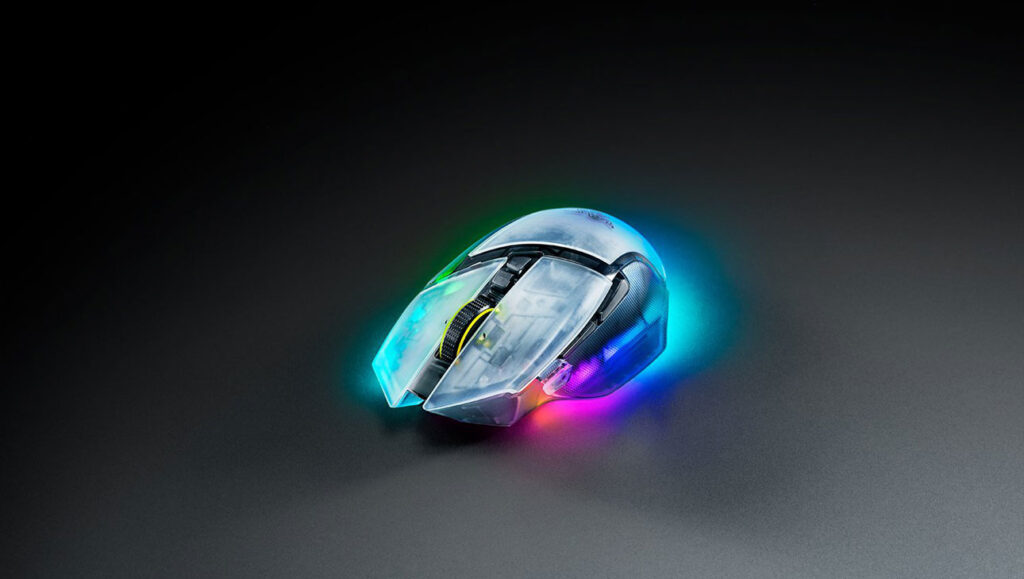
The Razer Basilisk V3 Pro 35K is a top-tier gaming mouse designed for serious gamers who want both precision and customization. It features the Focus Pro 35K Optical Sensor Gen 2, capable of up to 35,000 DPI, giving you very accurate tracking for FPS, MOBA, or any fast-paced gaming.
You also get flexible polling rates of 125Hz, 500Hz, and 1000Hz, along with a long-lasting battery life of up to 140 hours on Bluetooth and around 70 hours on HyperSpeed Wireless mode, so you can game all day without worrying about charging.
In terms of design, the Basilisk V3 Pro 35K is ergonomically shaped for right-handed players, making long gaming sessions more comfortable. It has 11 programmable buttons and a HyperScroll Tilt Wheel, allowing you to switch between tactile and free-spin scrolling.
The RGB lighting is fully customizable via Razer Chroma, adding a stylish touch to your setup. Connectivity-wise, you have Razer HyperSpeed Wireless for low-latency gaming, Bluetooth for productivity, and a wired option for direct connection.
Aesthetically, the mouse comes in multiple color options, including Black, White, Phantom Green, and Phantom White, with the Phantom White version offering a translucent design that really shows off the RGB lighting.
Priced at around $159.99, it’s a premium option, but worth it for gamers who want high-end performance, extreme customization, and reliable wireless performance.
2. Logitech G Pro X Superlight (Best for PUBG, CSGO, and FPS Games)

Specifications
- DPI: Up to 25,600
- IPS: 400
- Polling Rate: 1000Hz
- Response time: 1ms
- Programmable Buttons: 5
- Sensor: HERO 25K
- Type: Wireless
- Battery Life: 70 Hours
- Weight: 65gm
- Dimensions (LxWxH): 125 x 63.5 x 40 mm
Logitech G Pro X Superlight is an excellent gaming mouse for games like PUBG, CS: GO, and other FPS games. The mouse has a high-precision HERO 25K sensor that can be adjusted up to 25,600 DPI, making it highly accurate and responsive. It also has a fast 1ms report rate, which ensures that your movements are registered quickly and accurately.
In addition, the G Pro X Superlight is extremely lightweight, which makes it ideal for fast-paced FPS games. The mouse weighs only 63g, which is one of the lightest gaming mice on the market, allowing for quick and precise movements.
The G Pro X Superlight also features Logitech’s unique LIGHTSPEED wireless technology, which provides a stable and fast wireless connection. It has a battery life of up to 70 hours on a single charge, so you won’t have to worry about the mouse dying in the middle of an intense gaming session.
Overall, the Logitech G Pro X Superlight is an excellent choice for gamers who play fast-paced FPS games. Its high-precision sensor, fast response time, lightweight design, and wireless technology make it a top-performing gaming mouse that can help you take your gaming to the next level.
3. Logitech G305 Lightspeed (Best Budget/Cheap Gaming mouse)
Specifications
- DPI: Up to 12000
- IPS: 400
- Polling Rate: 1000Hz
- Response time: 1ms
- Programmable Buttons: 6
- Sensor: HERO
- Type: wireless
- RGB Lighting: No
- Weight: 99gm
- Dimensions (LxWxH): 116.6 x 62.15 x 38.2 mm
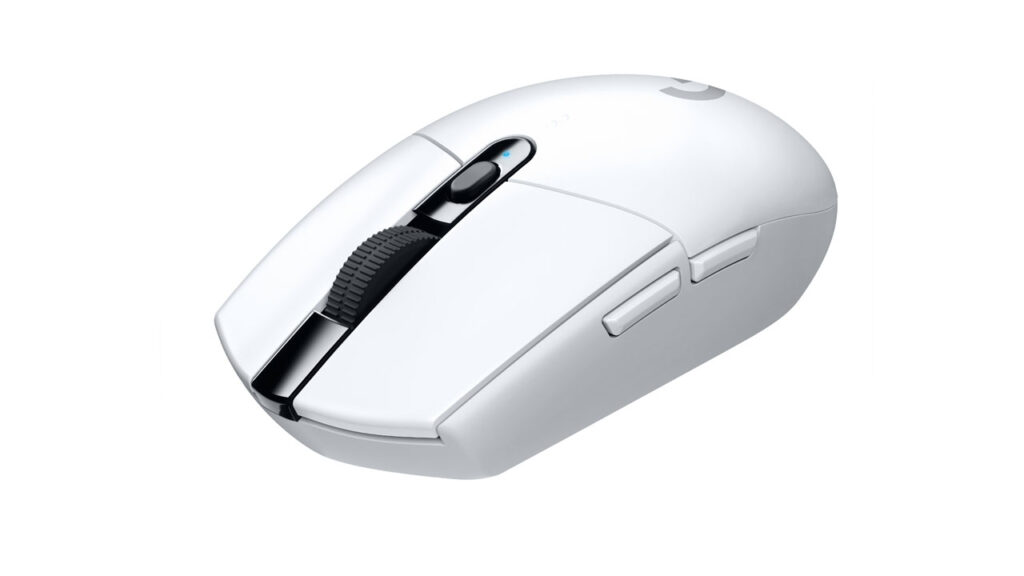
The Logitech G305 Lightspeed is one of those gaming mice that perfectly balances performance and affordability. It’s powered by Logitech’s HERO sensor, which gives you a sensitivity range of up to 12,000 DPI with zero smoothing or acceleration, meaning your aim stays sharp and consistent no matter how fast you flick.
The real magic, though, is in the LIGHTSPEED wireless technology, which delivers a 1ms response time; basically, it performs like a wired mouse but without the cable mess.
Despite being wireless, the G305 stays lightweight at around 99 grams, making it super agile for fast-paced games like Valorant, Apex Legends, or Overwatch. It runs on a single AA battery, but don’t worry, battery life is long, lasting around 250 hours in performance mode or several months in endurance mode. That’s easily one of the best battery performances among gaming mice in its price range.
Design-wise, the G305 keeps things simple and practical. It doesn’t have RGB lighting or flashy aesthetics, which might be a downside if you’re into glowy setups. It features six programmable buttons, which are enough for most gamers, and a compact, symmetrical shape that fits well for claw and fingertip grips. However, players with larger hands or those who prefer a palm grip might find it a bit small and flat.
Overall, the Logitech G305 Lightspeed is a total bang-for-your-buck mouse. You’re getting elite-level wireless speed, incredible precision, and battery life that lasts forever, all at a very reasonable price.
The only real trade-offs are the lack of RGB and a built-in rechargeable battery, but honestly, at this price point, it’s an easy win for anyone looking for a reliable gaming mouse without dropping a fortune.
4. Razer DeathAdder V4 Pro (Best wireless Gaming mouse)
Specifications
- DPI: 45,000
- IPS: 900
- Polling Rate: up to 8000Hz
- Response time: 1ms
- Programmable Buttons: 6
- Sensor: Focus Pro 45K Optical Sensor Gen-2
- Type: Wired/Wireless
- Battery Life: up to 150 Hours
- RGB Lighting: No
- Lifecycle: 100 million clicks
- Weight: 56gm
- Dimensions (LxWxH): 128 x 68 x 44 mm
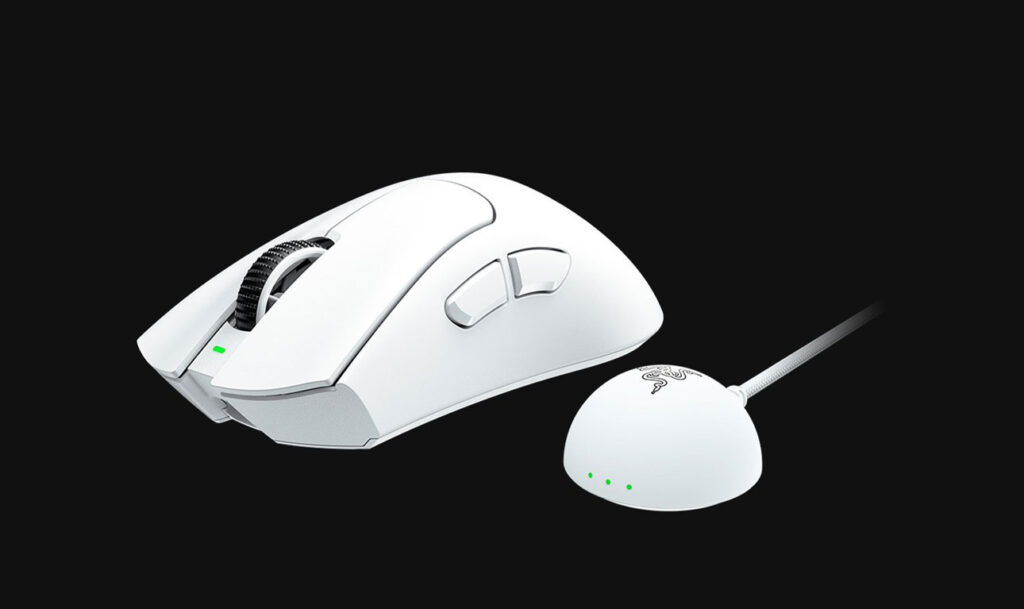
The Razer DeathAdder V3 Pro is considered one of the best wireless gaming mice due to its combination of exceptional features, high-performance capabilities, and ergonomic design.
The Razer DeathAdder V3 Pro is equipped with the Razer Focus Pro 30K DPI Optical Sensor, providing incredible accuracy and precision that caters to the needs of both casual and competitive gamers. Razer HyperSpeed Wireless technology guarantees a lag-free connection and ultra-fast data transmission, rivaling the performance of wired mice while offering you the convenience and freedom of a wireless device.
With an impressive 90-hour battery life, the Razer DeathAdder V3 Pro lets you game for extended periods without needing to recharge frequently. These features, along with the reputation of the Razer brand for delivering high-quality gaming peripherals, make the Razer DeathAdder V3 Pro one of the best wireless gaming mice available in the market.
5. Logitech G502 LIGHTSPEED (best high-end premium gaming mouse)

Specifications
- DPI: 25,600
- IPS: 400
- Polling Rate: 1000Hz
- Response time: 1ms
- Programmable Buttons: 11
- Sensor: HERO 25K
- Type: Wireless
- Battery Life: up to 60 Hours
- RGB Lighting: LIGHTSYNC 2 Zone
- Weight: 114gm +16gm extra optional
- Dimensions (LxWxH): 132 x 75 x 40 mm
The world of gaming has evolved exponentially, and so has the technology that drives it. one of the most talked-about gaming peripherals in recent times – is the Logitech G502 LIGHTSPEED. This high-end gaming mouse is designed to deliver unparalleled precision and responsiveness, making it a great choice for professional gamers and enthusiasts.
As the name suggests, the G502 LIGHTSPEED uses Logitech’s proprietary LIGHTSPEED wireless technology. This groundbreaking tech delivers a lag-free, wireless gaming experience without compromising performance.
The G502 LIGHTSPEED has an aesthetic Sporting ergonomic design, ensuring a comfortable grip during extended gaming sessions. Additionally, the mouse has 11 programmable buttons, allowing you to customize your gameplay experience. It also features a Powerplay-compatible design, which allows continuous wireless charging even during gameplay.
In conclusion, the Logitech G502 LIGHTSPEED is a trailblazer in the realm of high-end gaming mice. Its exceptional design, powerful performance, and customizable features make it the ultimate choice for gamers seeking a high-end gaming experience.
6. Razer Naga V2 Pro (Best for MMO/MOBA Games)

Specifications
- DPI: 30,000
- IPS: 750
- Polling Rate: 1000Hz (up to 4000Hz with Razer HyperPolling wireless Dongle)
- Response time: 0.2ms
- Programmable Buttons: 20
- Sensor: Razer Focus Pro 30K
- Type: Wireless
- Battery Life: up to 300 Hours
- RGB Lighting: Razer Chroma
- Lifecycle: 90 million clicks
- Weight: 134gm
- Dimensions (LxWxH): 119.5 x 75.5 x 43.5 mm
The Razer Naga Pro V2 is an excellent gaming mouse, especially for MMO and MOBA games. Its key features make it a top choice for gamers who require a vast array of programmable buttons and customizable options to enhance their gaming experience.
The Naga Pro V2 has a modular design, allowing you to swap between three interchangeable side plates with different button configurations (2, 6, or 12 buttons). This versatility is particularly useful for MMO and MOBA players, as it enables quick access to in-game commands, macros, and abilities.
Equipped with Razer’s high-precision 20,000 DPI Focus+ Optical Sensor, the Naga Pro V2 ensures accurate tracking and responsiveness, which is crucial for competitive gameplay. Furthermore, the mouse features Razer’s HyperSpeed wireless technology, providing a lag-free wireless experience comparable to wired mice.
The Razer Naga Pro V2 also supports Razer Chroma RGB lighting, allowing you to customize the aesthetics of the mouse with millions of colors and effects. Additionally, the mouse offers adjustable scroll wheel resistance, catering to individual preferences and ensuring a tailored gaming experience.
In general, the Razer Naga Pro V2 is an outstanding gaming mouse for MMO and MOBA games, with its modular design, high-precision sensor, and customizable options.
7. SteelSeries Rival 310 (best for big hands)

Specifications
- DPI: Up to 12,000
- IPS: 350
- Polling Rate: 1000Hz
- Response time: 1ms
- Programmable Buttons: 6
- Sensor: SteelSeries TrueMove3
- Type: wired
- RGB Lighting: 2 RGB Zones
- Lifecycle: 50 million clicks
- Weight: 88.3 g
- Dimensions (LxWxH):
- 127.6 x 70.1 x 41.98 mm
The SteelSeries Rival 310 is a suitable gaming mouse for individuals with larger hands. The Rival 310 features an ergonomic design with a slightly larger form factor, making it comfortable for various hand sizes and grip styles, including palm, claw, and fingertip grips.
The SteelSeries Rival 310 is equipped with a TrueMove3 optical sensor, offering a 100 to 12,000 CPI (counts per inch) range, which ensures precise tracking and responsiveness. The mouse also has durable mechanical switches that are rated for up to 50 million clicks, ensuring long-lasting performance.
The Rival 310’s silicone side grips provide enhanced control and comfort during extended gaming sessions. Additionally, it has customizable RGB lighting and six programmable buttons.
8. Glorious Model O – (best for small hands)

Specifications
- DPI: Up to 12,000
- IPS: 250
- Polling Rate: 1000Hz
- Response time: 1ms
- Programmable Buttons: 6
- Sensor: Pixart PMW-3360
- Type: wired
- RGB Lighting: Yes
- Lifecycle: 20 million clicks
- Weight: 58gm
- Dimensions (LxWxH): 120 x 63 x 23mm
The Glorious Model O – is a suitable gaming mouse for someone who has small hands. It features an ambidextrous design with a relatively low profile, which makes it comfortable for users with smaller hands.
One of the key features of the Glorious Model O – is its lightweight design, weighing only 58 grams. This makes it easier for users with smaller hands to maneuver the mouse during fast-paced gaming sessions. The honeycomb shell design further enhances the lightweight feel without compromising durability.
The Glorious Model O – is equipped with a high-performance Pixart PMW3360 sensor, offering a DPI range of up to 12,000, ensuring precise tracking and responsiveness. Additionally, the mouse features premium Omron mechanical switches that are rated for up to 20 million clicks, providing long-lasting performance.
Other features include customizable RGB lighting, six programmable buttons, and the Glorious Ascended Cord, which is a lightweight, flexible cable designed to minimize drag and improve overall handling.
9. Razer Viper 8K (Fastest Polling rate and response time)

Specifications
- DPI: Up to 20,000
- IPS: 650
- Polling Rate: 8000Hz
- Response time: 0.125ms
- Programmable Buttons: 8
- Sensor: Razer Focus+ 20K
- Type: wired
- RGB Lighting: Razer Chroma
- Lifecycle: 70 million clicks
- Weight: 71gm
- Dimensions (LxWxH): 126.7 x 66.5 x 37.8 mm
Which is the Fastest gaming mouse in the world?
The Razer Viper 8K has an exceptional polling rate and is well-suited for fast-response gaming. The Viper 8K features an industry-leading 8,000Hz polling rate, which is eight times faster than the standard 1,000Hz polling rate found in most gaming mice. This high polling rate translates to reduced input latency, ensuring faster and more accurate cursor movement, and providing a competitive edge in fast-paced games.
The Razer Viper 8K also features Razer’s Focus+ Optical Sensor with a DPI range of up to 20,000, offering precision and responsiveness. Its lightweight ambidextrous design and Razer Speedflex cable further enhance the gaming experience, minimizing drag and providing a comfortable grip for various hand sizes and grip styles.
Additionally, the Viper 8K is equipped with Razer’s 2nd Gen Optical Mouse Switches, which offer faster actuation and improved durability compared to traditional mechanical switches.
In summary, the Razer Viper 8K is an excellent choice for fast-response gaming, with its industry-leading 8,000Hz polling rate, high-performance sensor, and lightweight design providing a significant advantage in competitive gaming situations.
Which is the most expensive gaming mouse in the world?

It’s difficult to pinpoint the most expensive gaming mouse in the world as the prices of high-end gaming mice vary depending on various factors, such as limited-edition models, customizations, or special features. Moreover, manufacturers frequently release new models, and the market is constantly evolving.
That being said, some of the most expensive gaming mice on the market are typically from premium brands like Logitech, Razer, and Corsair, and they offer cutting-edge technology, exceptional performance, and advanced customization options. Some examples include the Logitech G502 LIGHTSPEED, Razer Basilisk Ultimate, and Corsair Dark Core RGB Pro SE.
However, when considering the most expensive gaming mouse ever created, the “MJ Luxury VIP Mouse” by the Russian brand MJ deserves a mention. This mouse is crafted from pure gold and adorned with diamonds, making it an ultra-luxurious and expensive option. Keep in mind that this mouse’s high price tag is primarily due to the materials used and not necessarily its performance or features.
It’s important to remember that a higher price doesn’t always guarantee better performance. When choosing a gaming mouse, consider factors like ergonomics, sensor quality, customization options, and compatibility with your gaming setup and preferences, rather than simply opting for the most expensive option.
Do you really need a gaming mouse?
Whether you need a gaming mouse depends on the type of computer user you are and the activities you primarily engage in. If you’re an avid gamer, especially in competitive or fast-paced games, a gaming mouse can provide better precision, responsiveness, and customization options than a standard mouse. These features can improve your gaming experience and potentially give you a competitive edge.
Gaming mice are often designed with ergonomics in mind, providing better comfort and support for your hand during extended use. If you spend long hours at the computer, whether gaming or working, a gaming mouse can help reduce strain on your hand and wrist.
Gaming Mouse often has better build quality and more durable components, like high-quality switches and sensors, which can result in longer-lasting performance compared to standard mice.
That being said, if you’re not a dedicated gamer and primarily use your computer for casual browsing, office work, or other non-gaming tasks, a standard mouse should suffice. A gaming mouse may not provide a significant advantage in these situations, and the additional cost might not be justifiable. Ultimately, the decision to invest in a gaming mouse will depend on your specific needs, preferences, and budget.
Conclusion
Well, that’s it for our guide on buying the best gaming mouse right now. We will update this guide as time progresses and new gaming peripherals hit the market. Meanwhile, you can also share your experience and opinions and experience with different gaming mouse in the comment section. We will be sure to look at them and may use them for the next update.