


Rise of Kingdoms (ROK) is mostly about making strategies, war, and finding out who can spend more with their visa cards. However, that shouldn’t stop you from making a beautiful city layout and showing off around the Rise of Kingdoms community.
We have found some truly awesome-looking city layout designs which you can use for inspiration. Whether you like a clean and simple city design or a fully detailed and stuffed city design, we have added both. Additionally, there are some funny and cute city layouts to make you smile and go Aww.
Please read this: We don’t own any of the designs, they were randomly collected from the game. You can comment below or reach us by going to the Contact Us page for proper credit or removal.
How to submit your designs: Upload city design images to Google Drive or any other image hosting site and share the link with us in a comment. We will update them here to inspire others:)
Does base layout matter in the rise of kingdoms?
No, the base layout does not matter in ROK as it does in some other games like Clash of Clans. It’s purely decorative and doesn’t affect your city’s defense.
Can you copy layouts in Rise of Kingdoms?
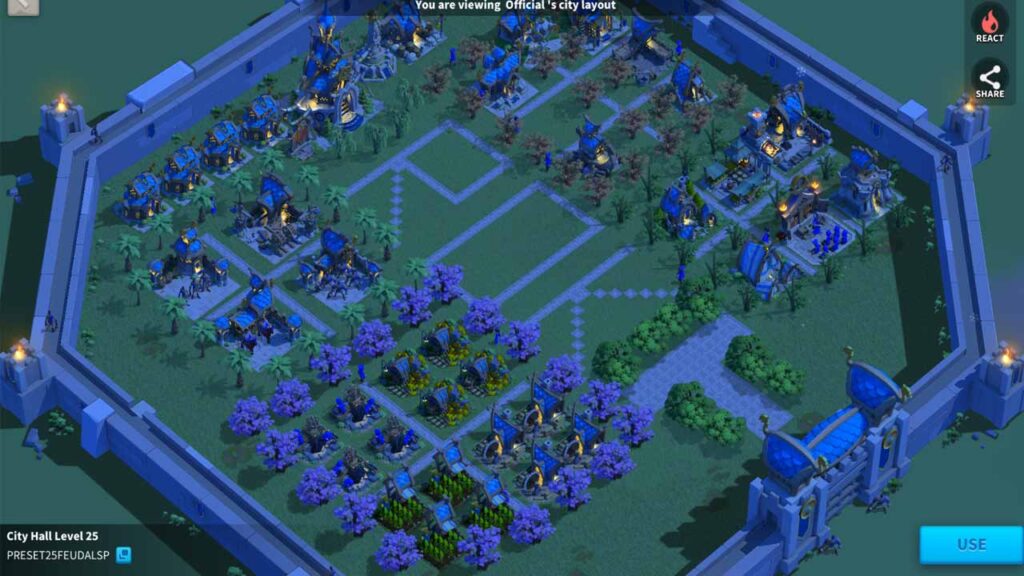

Yes, you can copy and paste your city layout into the ROK. The new update also allows you to copy another player’s layout. Below you can find step by step guide to do that.
- First, open the city editor
- Now, Go to Cityscape
- Inside Cityscape You will see a search box in the top corner.
- Paste the layout ID there and search
- Once you find that particular layout, click on it to open it
- On Bottom Right corner, you will see the use button
- Upon clicking the use button, the game will take you to the city editor
- Choose Empty Layout, and it will automatically paste all items there.
- Finally, set that layout as active to make it live
Note: You can acquire the layout ID by asking otherplayers. Only they can share the layout ID. That means you can’t just copy any layout, only the ones that are shared with you.
Best city layout designs


Funny City layout
Warning: Images below might be offensive to some people, only proceed at your own wish.


How to design your city layout in ROK
Now, after seeing all of these designs, if you are feeling inspired or creative, this is how you can design your city layout in Rise of Kingdoms.
- Click on the build icon(one that looks like a tiny hammer) located at the bottom left.
- Now, click on the City editor icon.
- In the city editor, you have three options: “Edit”, “Copy”, and “Apply”. You can create up to three designs. You can copy design 1 and paste it into design 2 or 3, and you can activate any one of them by clicking active.
- Click on Edi,t and it will open up the city layout editor. You will see all of the buildings and decorations located on the bottom panel. Drag them onto the map and start designing your city how you see fit.
- Buy more decorative items like roads, trees, sculptures, and limited edition structures, and include them in your design


Those funny city layouts are the best, lol
Yeah, haha