Touchscreen laptops have become more than just a fun flex. Now they’re powerful tools for creative pros, students, office warriors, and multitaskers. From a laptop-tablet hybrid to a big screen for sketching and streaming, there are some seriously impressive choices out there. Here are the top picks for touch-screen laptops that are worth checking out before making a purchase.
Lenovo ThinkPad X9 Aura Edition – Best Overall

Key Specs
- Display: 15.3″ OLED 2.8K (2880×1800), 120 Hz touch panel
- CPU: Intel Core Ultra Series (5/7 options)
- Memory/Storage: Up to 32 GB LPDDR5X, 2 TB SSD
- GPU: Intel Arc integrated graphics
- OS: Windows 11 Pro
- Special: Copilot+ PC with NPU for AI tasks
Display & Touch Experience
The X9 Aura Edition’s OLED touchscreen delivers rich contrast, deep blacks, and excellent color coverage (near full DCI-P3). With a 120 Hz refresh, scrolling and animations feel extra fluid. It’s ideal for design apps, quick multitasking, and watching media.
Who Is It For: Professionals, business users, and creators
Acer Swift 16 AI – Best Big Screen

Key Specs
- Display: 16″ OLED touchscreen, 2880×1800, 120 Hz
- CPU: Up to Intel Core Ultra X9 388H
- GPU: Intel Arc B390 integrated
- Memory/Storage: Up to 32 GB LPDDR5X, 2 TB SSD
- Extras: World’s largest haptic touchpad with stylus support
Display & Touch Experience
This bad boy’s big OLED panel has great immersive visuals: super crisp resolution, excellent color accuracy, and buttery touch responsiveness paired with a haptic touchpad that supports stylus input. It’s made for creators who hate compromises.
Who Is It For: Power users, multimedia creators, and multitaskers who want a laptop that feels futuristic
Acer Chromebook Plus Spin 714 – Best Chromebook Touch Experience

Key Specs
- Display: 14″ 16:10 WUXGA (1920×1200) IPS touchscreen (100 % sRGB)
- CPU: Intel Core Ultra Series
- Memory/Storage: Up to 16 GB LPDDR5X, up to 512 GB SSD
- OS: ChromeOS
- Extras: Active stylus included
Display & Touch Experience
It has a lovely 14″ IPS touch panel with a wide color gamut and a tall 16:10 ratio, making it great for browsing, multitasking, and productivity with ChromeOS. Hinge lets you flip to tablet or tent mode. It has Stylus support, which means handwritten notes feel natural.
Who Is It For: Students, everyday users, and light multitaskers
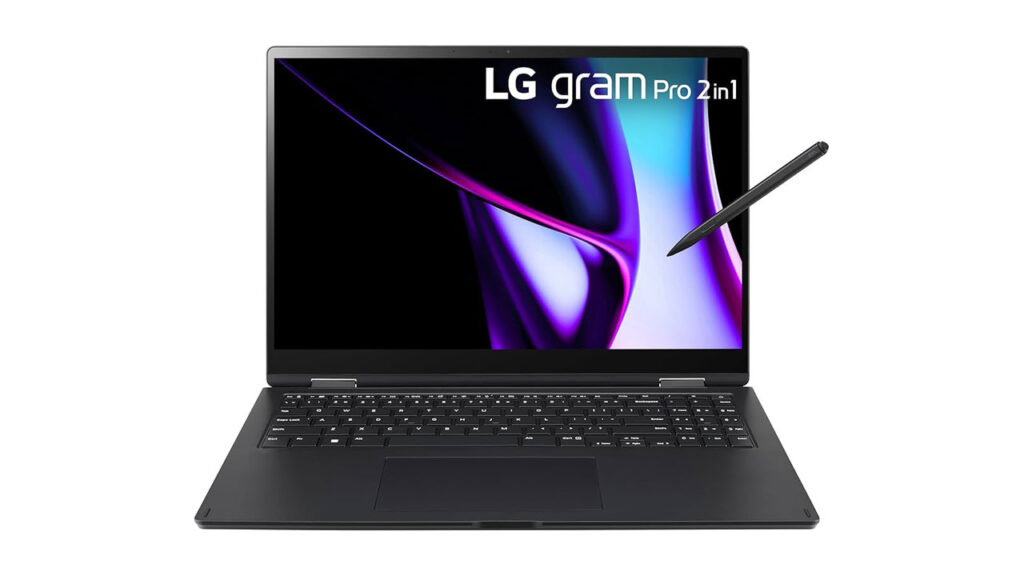
LG Gram Pro 2‑in‑1 16-inch – Best Convertible
Key Specs
- Display: 16″ OLED or vivid LCD touchscreen (2560×1600)
- CPU: Intel Core Ultra Series
- Memory/Storage: Up to 32 GB RAM, up to 2 TB SSD
- OS: Windows 11 Home/Pro
Display & Touch Experience
The LG Gram Pro 2-in-1 16 features a large 16-inch high-resolution touchscreen with a tall 16:10 aspect ratio, giving you more vertical space for productivity, multitasking, and creative work compared to standard laptops. The display looks sharp and vibrant, making text crisp and media immersive, while wide viewing angles help maintain clarity whether you’re typing, drawing, or watching content.
Who Is It For: Creatives and digital artists who want a convertible design.
ASUS ProArt PX13 – Best OLED Touchscreen

Key Specs
- Display: 13.3″ 3K (2880×1800) OLED touchscreen, 16:10, 500 nits HDR peak
- CPU: Snapdragon X Plus (Qualcomm)
- Memory/Storage: Up to 16 GB LPDDR5X, up to 1 TB SSD
- OS: Windows 11
- Extras: Copilot+ PC AI capabilities
Display & Touch Experience
ASUS ProArt PX13 has one of the nicest small OLED touchscreens out there. It has very high pixel density, and deep blacks make creative work look amazing, with smooth, accurate touch, and all of that with stylus support. This is one of the best laptops for drawing, design, and content editing.
Who Is It For: Artists, designers, and creators doesn’t compromise color or detail.
Microsoft Surface Pro – Best Tablet 2-in-1

Key Specs
- Display: 13″ PixelSense touch (2880×1920), 120 Hz, 3:2 ratio
- CPU: Qualcomm Snapdragon X or Intel Core Ultra options
- Memory/Storage: Up to 64 GB RAM, up to 1 TB SSD
- OS: Windows 11 Home/Pro
- Extras: Stylus + detachable keyboard (sold separately)
Display & Touch Experience
The Microsoft Surface Pro 11th Edition features a 13-inch PixelSense touchscreen with a sharp 2880×1920 resolution and a taller 3:2 aspect ratio. The display looks crisp and vibrant, with excellent brightness and color accuracy, making everything from documents to creative apps look premium. Touch input is extremely responsive, and when paired with the Surface Pen, writing and drawing are natural and precise.
Who Is It For: Ultimate choice for students, note takers, and creators looking for a tablet + laptop hybrid
Final Words
This are curruntly the best touch-screen laptop in the market for diffrent purpose and usage. The touch-screen tech is still getting better everyday and we are expecting to see even more touch screen based laptop in the near future. We will continue to update this list as new models comes in the market.