Every year, countless new laptops are released in the market. Some of them are good, and some are bad, but the ones we are looking for are the best. There are several different laptop companies in the market, and on top of that, they offer various laptop series and models.
The sheer number of laptop choices available in the market can be quite overwhelming. That is why we decided to create this simple list, which will help you pick out the best laptop based on your personal needs without going through the headache of sorting through millions of different laptop models.
It doesn’t matter whether you are looking for a gaming laptop, a business laptop, a budget laptop, a dual-screen laptop, or pretty much any other type; we have you covered in this list. So, without further delay, let’s get started.
Things We Considered While Making This List
- Value for money: Yes, a laptop can be really great, but if it costs a ridiculous amount of money, then it might not be worth it. There might be laptops out there that cost significantly cheaper but perform just slightly less compared to expensive laptops. We have given Value for money top priority, meaning any laptop you pick from this list will surely give you the best bang for the buck.
- Intended Use: Not all of us use laptops for the same task; some use them for gaming, some use them for work, while others might use them for watching movies and daily tasks. We have added a laptop for all of these different activities.
- Performance: Of course, we have considered Performance; no one likes to use a slow and laggy laptop. We have thoroughly checked the Processor, graphics, RAM, and storage options.
- Storage: Not all tasks need the same amount of storage. For example, daily tasks don’t really need that much storage space, while content creation will require significantly more storage options. We have also checked storage options as well as additional storage upgrade options.
- Display: Display is also an important aspect of the Laptop. There are several things you need to check, like display size, resolution, peak brightness, and color accuracy. But don’t worry, we have done that for you, too.
- Battery Life: Longer battery life means you can use your laptop without needing to be constantly tethered to a power outlet. However high performance laptops generally have less battery life. So, we have added laptops that strike a fine balance between performance and battery life.
- Portability: if you travel a lot, then the weight and size of the laptop also matter a lot. Small and lightweight laptops will be much easier to carry around.
- Build Quality: A well-built laptop can withstand daily wear and tear, reducing the likelihood of damage from accidental drops, bumps, or spills. So, if you are planning to keep the laptop for several years, build quality also becomes important.
- Keyboard and Touchpad: The keyboard and touchpad directly impact your usability, comfort, productivity, and overall user experience of a laptop, making them important considerations when you purchase a new laptop.
- Connectivity: The laptop has several different ports, like USB Type-C, HDMI, etc., which help you connect several other devices. So, it’s you also need to consider them based on your usage.
- Operating System: Windows, macOS, or Chrome OS They all have different software features. Generally, this won’t be much of a problem, but sometimes Apple can be really restrictive with its software, not allowing you to connect with other brands of products. That’s why you also need to check the Operating System of the laptop to make sure it connects with your other devices, like smartphones and tablets
- Warranty and Support: It has happened several times with us that as soon as we purchased the product, the company forgot that we existed and stopped providing any support whatsoever. So, it also becomes important that you buy a laptop from a reputable brand that will provide timely support in case your laptop runs into a problem.
- Future-proofing: Last but not least, Laptop components, build quality, and software support from the company need to be good enough to last you for several years. A laptop isn’t something you will be changing every few weeks, which makes future-proofing very important.
Now that you know all the things we have taken into consideration before making this list, let’s look at the laptops themselves.
1. Apple MacBook Air M4 – Best Overall

Pros
- Powerful Performance
- Long Battery life
- Bright and rich display
- Great value for money
Cons
- Limited port options
- Not for heavy gaming
- Config upgrade cost
We looked and looked, but honestly couldn’t find a laptop that nails the balance as well as the Apple MacBook Air M4. And no, we’re not turning into Apple hype beasts, the machine is just genuinely that solid.
The biggest flex of the MacBook Air M4 is its performance. The new M4 chip is super fast and can chew through everyday tasks, editing, multitasking, and browser-tab chaos like it’s nothing. But that’s not even the coolest part; the real magic is how efficient this chip is. You get serious power without the fans, heat, or battery drain you’d expect from something this capable.
Speaking of battery, this thing goes on and on. With normal day-to-day use, the Air M4 easily lasts as long as a smartphone, which is wild for a full laptop. You can basically carry it around all day without worrying about finding a plug, and that’s great for students, creators, and travelers.
The design is still slim, still super portable, and still one of the cleanest-looking laptops you can buy. A machine this powerful and this efficient in a body this tiny is honestly kind of rare. Apple didn’t change the form factor much, and to be honest, they didn’t need to.
The Liquid Retina display also continues to be great. It’s bright, sharp, and colorful enough to make movies, photos, and even random YouTube videos look extra crisp. The keyboard and trackpad remain peak Apple smooth, precise, and premium every time you use them.
As for the rest of the features, Touch ID works flawlessly as usual. The upgraded 1080p webcam holds up well for video calls, and Apple still consistently delivers great quality when it comes to microphones, speakers, and overall call clarity.
Now, the MacBook Air M4 isn’t perfect. The slim design still comes at the price of limited ports: two Thunderbolt ports, a headphone jack, and MagSafe charging. So yeah, if you plug in a lot of accessories, you’ll need to keep a USB-C hub around.
While the M4 is super powerful, it’s not built for heavy gaming. You can run games if they’re optimized for Apple Silicon, but history shows developers don’t always bother, and that’s just how it is.
All things considered, if gaming isn’t your priority and you’re okay with the port situation, it’s hard to find a better all-rounder in this price range. The MacBook Air M4 13-inch starts around $1,099, and the 15-inch model comes in at around $1,299.
2. Lenovo Yoga 9i 2-in-1 (Aura Edition) – Best Overall for Windows
Pros
- Powerful Performance
- Premium 2-in-1 Flexibility
- Great Port Selection
- Long Battery Life
- Stunning OLED Display
- Value for Money
Cons
- Apple MacBook Air M4 is a better Value for money
Not everyone wants to go the Apple route, and honestly, that’s totally valid. Not all of us want to lock ourselves inside the Apple ecosystem forever. So here’s the best overall Windows option, and this time, it’s one of Lenovo’s most polished premium machines.
Lenovo’s Yoga series has been around for years, and it’s one of the most trusted 2-in-1 laptop lineups out there. Our team has used several Yogas over the years, and their durability and reliability are impressive. They age well, and that says a lot.
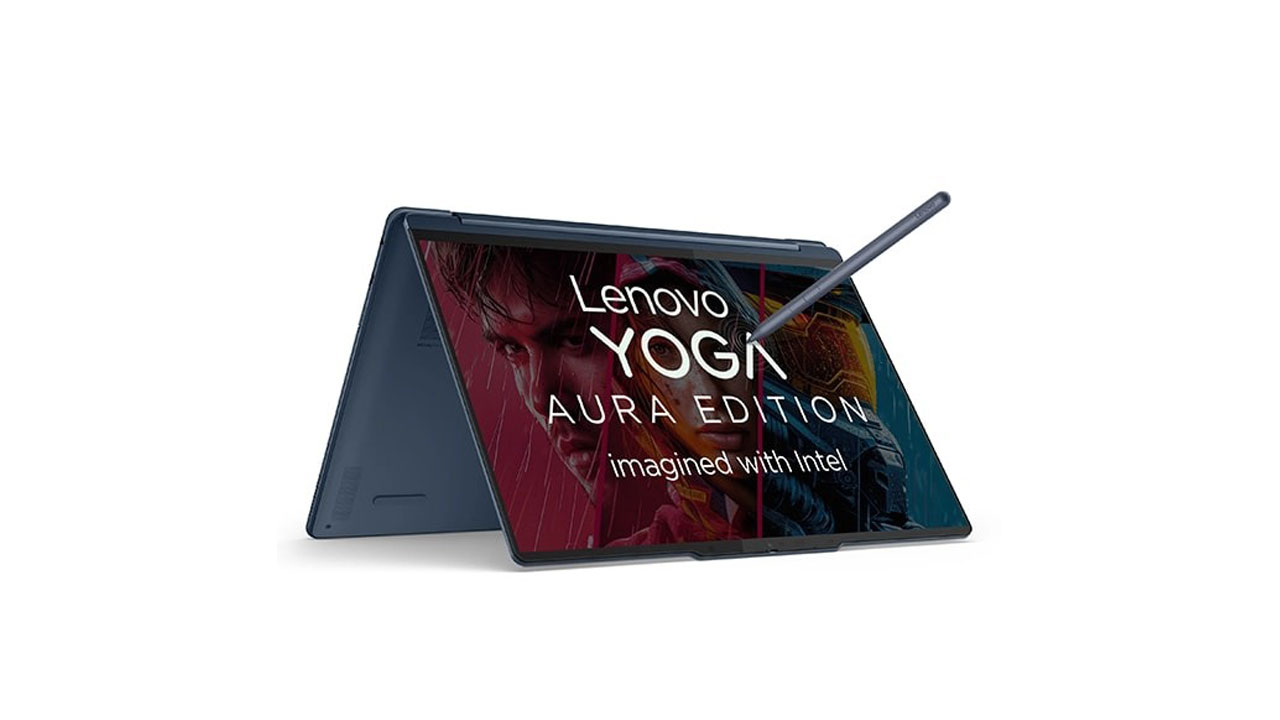
The coolest part about the Yoga 9i 2-in-1 (Aura Edition) is that it gives you that premium flexibility without sacrificing power. And because it’s a convertible, you can switch between laptop, tablet, tent mode, or presentation mode whenever you want, making it perfect for creators, students, and anyone who switches tasks on the fly.
There are a couple of display options, but the Aura Edition is all about that 3K or 4K OLED panel, which looks absolutely gorgeous. Touch support is built in, colours look rich, blacks are deep, and overall visuals are way better than most IPS panels. If display quality matters to you even a little, this is a perfect choice.
Performance-wise, Lenovo gives you multiple configuration options. You can go with Intel Core Ultra 7 or Ultra 9, depending on your workload. These chips handle multitasking, editing, productivity apps, and creative work easily. There’s no dedicated GPU here, but Intel Arc integrated graphics do a surprisingly solid job for light editing and casual gaming.
You also get the option to pick RAM and storage sizes according to your needs, and since this is Windows, you have complete freedom in terms of apps, customization, and connectivity. No restrictions, no ecosystem pressure, pure flexibility.
Battery life on the Yoga 9i 2-in-1 is really solid. It’s not quite at MacBook-Air-M4-level, but it still lasts long enough to comfortably get you through a full workday, especially with the OLED display tuned to moderate brightness.
Now, about the price, it depends on the config you choose. Higher-end OLED + Ultra 9 models can go up to around $1,699, while lower configurations sometimes sit closer to $1,399. Whichever one you pick, you’re paying for a premium 2-in-1 that definitely delivers value.
Compared to the Apple MacBook Air M4, sure, the battery life and raw efficiency aren’t quite at the same level. But the Yoga 9i 2-in-1 gives you better overall versatility, way more port options (including USB-A, USB-C, and sometimes even HDMI depending on the region), full touchscreen functionality, stylus support, and the ability to fold the laptop into different modes, something a MacBook simply can’t do.
- Find the best deal on Lenovo Yoga 9i 2-in-1 (Aura Edition) – Intel Core Ultra 7 256V
- Find the best deal on Lenovo Yoga 9i 2-in-1 (Aura Edition) – Intel Core Ultra 7 258V with WQUXGA OLED Display
- Find the best deal on Lenovo Yoga 9i 2-in-1 (Aura Edition) – Intel Core Ultra 7 258V with 2.8K OLED Display
3. Acer Aspire Go 15 (2025) – Best Budget

Pros
- So much Value for money
- Solid Performance for the Price
- Upgrade Options
- Modern & Clean Design
- Lightweight for a Budget Laptop
Cons
- Battery Life is Average
- Display Quality is Decent
Yes, those premium laptops look flashy and perform like absolute beasts, but that doesn’t mean you need to drop a whole paycheck just to feel included. Sometimes the smart move is to get a laptop that does everything you actually need, without burning a hole in your wallet.
The Acer Aspire Go 15 (2025) is exactly that kind of budget-friendly champ. Starting at just $349, this thing packs way more value than you’d expect at this price. It’s honestly wild how much Acer squeezed into such an affordable laptop.
You get the latest Intel Core 5 120U or Core 3 100U processors, depending on which model you pick. Both of them easily handle everyday tasks, browsing, streaming, office work, and even light creative workloads. Pair that with 8GB or 16GB RAM plus SSD options starting at 256GB, and you’re looking at a laptop that’s way more capable than a typical budget machine.
The Aspire Go 15 also has upgrade options for storage, which is a huge win for anyone who wants to expand later without buying a whole new laptop. And while it doesn’t come with a dedicated GPU (most budget laptops don’t), the Intel integrated graphics can still manage light gaming and casual editing.
Both models come with a 15.6-inch FHD display, and while the panel isn’t top-tier, it’s perfectly fine for everyday use. The bezels are slim, the colours are okay, and the brightness is decent enough for indoor usage. Basically, it does the job without trying to be fancy, and that’s fair for its price.
The design is pretty nice for a budget laptop. It has that minimal, modern look that doesn’t scream “cheap,” and the build quality is surprisingly sturdy. It definitely looks more premium than its actual price tag.
We went through so many options in the budget category, but none of them delivered the same combination of performance, design, upgradability, and affordability as the Acer Aspire Go 15 (2025). If you want a practical everyday laptop that handles work, entertainment, studies, and casual gaming, all without costing a fortune, this is the one.
4. Asus Zenbook 14X OLED – Best for Students

Pros
- Good quality OLED display
- Performance
- Looks good for a budget laptop
- Not too expensive
- Decent battery life
- Thin and Lightweight
Cons
- No dedicated GPU
If you’re buying a Laptop for study, there are a couple of things you need to pay close attention to.
First is the display; you will spend quite a bit of time on it, so you need to make sure that your laptop has a display that won’t hurt your eyes. Asus Zenbook 14X OLED has a 3K OLED touch Display.
OLED is considered the safest screen technology for your eyes. So, you can use this laptop for a longer duration without straining your eyes. You can also take advantage of the touch screen to quickly browse through your assignments.
Another thing is the battery life; you won’t always have access to a charging socket. Luckily, the Asus Zenbook 14x OLED will easily last around 8-9 Hours in normal performance mode.
Speaking of performance, it’s powered by i7-13700H along with Intel Iris X graphics. In case you get bored studying, you can use it for gaming for a while. However, due to the lack of an external GPU, you won’t be able to play demanding games.
At 16.9 mm in thickness and just 1.5 Kg in weight, the Asus Zenbook 14x OLED is very thin and lightweight. As a student, you will definitely be moving your laptop around often, so it’s good to have a lightweight laptop like this.
As a student who has several other expenses, you might not want to spend too much on a laptop. Luckily, the Asus Zenbook 14X OLED is currently available for $929, and at that price, it offers everything you need in a student laptop.
5. Apple MacBook Air M2 – Best for MacBook for Student

Pros
- Great Retina display
- Powerful Performance
- Not too expensive
- Great battery life
- Thin and Lightweight
Cons
- No dedicated GPU
- limited ports
Well, if you prefer Apple’s macOS over Windows, then the Apple MacBook Air M2 will be a great choice.
After the release of the new M3 MacBook, the M2 version is available at $849. For that price, it has a lot of good stuff to offer.
First up, M2 is still a very powerful chip compared to Intel and AMD laptop processors. So you have nothing to worry about in terms of performance.
On top of that, you will get a 13.6-inch Liquid Retina display along with long-lasting battery life.
The MacBook Air M2 is also very thin and lightweight. So, it has pretty much everything you need in a student laptop. Overall, it’s a perfect alternative to the Asus Zenbook 14X OLED for Apple users.
6. Dell XPS 13 (9350/2025) – Best Ultraportable

Pros
- Thinnest and lightest XPS ever
- Stunning OLED display option
- Powerful Performance
- Long battery life
Cons
- Keyboard travel is shallow
- Expensive
Ultraportables are made for people who’re constantly on the move, travelers, business professionals, students who hop between classes, or anyone who just wants a laptop that doesn’t feel like carrying a brick. When portability matters, these ultra-thin machines become a lifesaver.
The Dell XPS 13 (9350/2025) is one of the most refined ultraportable laptops you can buy right now. It’s very compact, super lightweight, and built with that premium XPS design language that always turns heads. Dell somehow keeps making this series slimmer every year while still pushing performance higher.
It comes with a 13.4-inch FHD+ or 3K OLED display, and both options look sharp, vibrant, and crisp. The OLED variant especially feels like watching content on a tiny flagship TV, with deep blacks, rich colours, and pure eye-candy visuals.
Inside, it runs on Intel Core Ultra 7 or Ultra 5 processors, paired with Intel Arc graphics. This combo handles everyday work, productivity, multitasking, streaming, and creative tasks with zero stress. For something this thin, the performance is super impressive.
For ports, Dell keeps things minimal; you get two Thunderbolt 4 USB-C ports, plus an optional USB-C dongle for extra connectivity. It’s not a lot, but that’s the trade-off you make with ultra-thin laptops. When the design is this sleek, compromises are kinda unavoidable.
Battery life is also really solid on the XPS 13 (2025). You can expect around 10–12 hours of normal use, depending on whether you choose the OLED display or not. Either way, it easily holds up through a full day if you’re bouncing between meetings, classes, or travel.
We genuinely don’t think there’s another Windows ultraportable that blends design, display quality, performance, and portability as well as the latest XPS 13. If you’re searching for a premium, lightweight laptop that you can take everywhere without breaking your back, the Dell XPS 13 (9350/2025) should be at the very top of your list.
7. Razer Blade 16 (2025) – Best Gaming Laptop

Pros
- Looks absolutely premium
- Performance is beyond expectations
- Advanced cooling system
- The display is perfect for gaming
- RGB backlit keyboard feels amazing
- Great Value for a flagship gaming laptop
Cons
- Battery life
- Very expensive
Now it’s time to talk about everyone’s favorite category, gaming laptops. And trust me, there are way too many options out there. Picking just one wasn’t easy at all. But after looking at everything from design to cooling to raw performance, one machine stood out above the rest.
We’re talking about the Razer Blade 16 (2025), the definition of a premium gaming laptop done right. It has the superb performance you expect from a flagship, the clean gamer aesthetic Razer is known for, a killer cooling system, one of the best displays in its class, and overall delivers a ton of value for a high-end gaming device.
Inside, you’re getting a beastly setup: Intel Core Ultra 9, paired with an NVIDIA RTX 5080 Laptop GPU, 32GB DDR5 RAM, and 1TB PCIe Gen4 SSD. This combination is built to destroy any modern AAA title at ultra settings, no questions asked. From competitive shooters or massive open-world games, this laptop just eats through everything.
But powerful specs alone aren’t enough, especially for long gaming sessions. You need proper cooling so the performance doesn’t dip. Razer handles this extremely well with its next-gen vapor chamber cooling, high-efficiency fans, and improved airflow design. Everything works together to keep the Blade 16 running cool and stable, even when you’re pushing it hard.
Now, the display is a masterpiece here. The Razer Blade 16 (2025) features a 16-inch QHD+ 240Hz display with full DCI-P3 coverage. The high refresh rate makes gameplay buttery smooth, the color accuracy makes everything look crisp and vibrant, and the brightness is strong enough for any environment. If you care about visuals, this display goes beyond expectations.
Razer also nails the design aspect. The screen has super-thin bezels that give you an immersive gaming experience without distractions. Thick bezels are a total vibe killer, and Razer knows that. The premium aluminum unibody chassis also feels rock-solid while still managing to stay sleek and classy.
The RGB keyboard is another highlight. Razer Chroma is one of the best lighting systems in the gaming world, and typing on this keyboard feels both premium and super satisfying. The touchpad is huge, smooth, and feels MacBook-level good.
Overall, the Razer Blade 16 (2025) delivers everything you want in a high-end gaming laptop: powerful performance, elite-level display, next-gen cooling, a premium build, and RGB that hits the right spot. It starts around $2,999, which is definitely pricey, but the experience you get feels just as premium, if not more.
If you want the absolute best gaming laptop you can buy right now, something that looks high-end, performs like a monster, and feels incredible to use, the Razer Blade 16 (2025) is the one.
8. Acer Nitro V – Best Budget Gaming Laptop

Pros
- Great performance for gaming
- Good build quality
- Lots of connectivity options
- Decent display for a budget gaming laptop
- So much Value for money
Cons
- Battery life
- You will defiantly get a feel of a budget laptop here and there
What if you want a gaming laptop but don’t want to spend too much on it? Behold Acer Nitro V, our pick for the Best budget gaming laptop.
It comes with Intel Core i5-13420H and RTX 3050, which should be good enough for 1080p gaming at high settings in most games.
The display size is 15.6 inches with FHD resolution and 144Hz. It’s a really good display for a budget laptop.
The cooling system does work efficiently in this laptop, but the fans get really loud. Well, budget gaming laptop do have their downside. However, this can be easily fixed by using a gaming headset.
Priced at just $692, Acer Nitro V will provide you with great value with its combination of capable hardware and gaming features. While it certainly doesn’t feel as Premium as the Razer Blade 16, it’s still a solid gaming laptop at this price tag.
9. Vivobook 16 Flip – Best 2 in 1 Laptop

Pros
- Beautiful 16-inch OLED display
- Thin and premium-looking design
- Lots of connectivity options
- Long-lasting battery
- Large keyboard and smooth, responsive touchpad
Cons
- Webcam quality could be better
2-in-1 laptops can switch between laptop, tablet, tent, and stand modes, which makes them very flexible for different tasks. Whether you’re typing normally, sketching on the touchscreen, presenting something, or watching shows hands-free, a convertible design adapts to whatever you’re doing.
The Asus Vivobook 16 Flip features a gorgeous 16-inch 3.2K OLED 60Hz touchscreen with a 16:10 aspect ratio. The panel is sharp, vibrant, and incredibly color-rich thanks to full DCI-P3 coverage and HDR support.
Powered by Intel Core i7-1360P or Ryzen 7 7730U, depending on the model, along with up to 16GB RAM, the Vivobook 16 Flip handles multitasking, office apps, and creative workflows smoothly. It’s not built for heavy gaming, but it easily manages everyday tasks and light graphics work without breaking a sweat.
The design is sleek and durable, and the 360-degree hinge gives you all the flexibility you expect from a 2-in-1. You can flip it into tablet mode for drawing, tent mode for videos, or just use it like a normal laptop when working. It also supports the Asus Pen, making it a solid pick for note-takers and creative users.
Even though it’s a 16-inch machine, it’s still reasonably portable. It’s not feather-light, though tablet mode can feel a bit heavy over long periods because of its size and weight.
Battery life is also pretty solid, easily lasting through a full day of light to moderate usage. And connectivity is strong too: you get USB-A, USB-C, HDMI, a microSD slot, and a headphone jack, so you don’t have to live the dongle life.
Overall, the Asus Vivobook 16 Flip is a versatile and feature-packed 2-in-1 laptop with a big, stunning OLED display, smooth performance, great port selection, and dependable battery life. If you want a spacious convertible laptop for work, entertainment, and creative tasks, this one is definitely worth considering.
10. Samsung Galaxy Chromebook Plus – Best Chromebook

Pros
- Sturdy premium build for a 2-in-1
- Good performance for a Chromebook
- Vibrant touch display
- Great port selection for the category
- Very affordable
Cons
- Battery life could have been better, considering it’s not performance-heavy
If you just need a laptop for browsing, streaming, studying, light work, or everyday tasks, Chromebooks are such a smart choice. They’re way cheaper than most Windows or Mac laptops, super easy to use, and ChromeOS is clean, lightweight, and beginner-friendly.
The Samsung Galaxy Chromebook Plus offers impressive performance thanks to its Intel Core i3 (U-series) processor paired with 8GB of RAM, making it smooth for multitasking, handling multiple Chrome tabs, running Android apps, and even doing some light productivity work. For casual users, this chipset is more than enough.
Samsung went with its classic premium approach for the design. The Galaxy Chromebook Plus has a sleek and sturdy 2-in-1 aluminum body, which feels way more high-end than most Chromebooks in this price range. The convertible hinge lets you switch between laptop and tablet mode effortlessly, making it great for notes, sketching, or just scrolling.
The 14-inch FHD touchscreen is one of the highlights here. Colors look vibrant, brightness is good, and overall, the display is perfect for streaming shows, browsing, or doing schoolwork. Samsung always nails its panels, and even on a Chromebook, it shows.
Port selection is also solid: you get USB-C, USB-A, a microSD card slot, and a headphone jack, which is better than many Windows laptops in this price range.
Battery life is fine but not mind-blowing, around 7–9 hours depending on brightness and workload. It’s good enough for a regular day of classes or work, but considering it’s not a high-power device, we definitely expected a little more stamina.
At around $499, the Samsung Galaxy Chromebook Plus is a super solid option for casual users who want a reliable, stylish, and functional laptop for everyday use. If all you need is something simple, smooth, and affordable, this Chromebook is an easy recommendation.
11. Lenovo Thinkpad X1 Carbon Gen 12 – Best for Business

Pros
- lightweight design
- Packed with lots of performance
- Beautiful OLED display
- Great Keyboard to work with
Cons
- Expensive
- The speaker isn’t loud enough
Security and privacy are top priorities for business laptops. Along with that, it also needs a good sturdy design that is also lightweight at the same time. It also needs good battery life and connectivity options to use at the workplace.
Lenovo Thinkpad X1 Carbon has all of these features. It comes with a fingerprint reader and Facial recognition for secure login. There is also TPM for data encryption and Intel Threat Detection Technology for protection against ransomware attacks. So, in terms of security, you have nothing to worry about
One of the best things about Thinkpad X1 Carbon Gen 12 is its weight. At just 1.09kg/2.42 lbs, it’s incredibly easy to carry around, which is perfect for professionals on the move. Despite its lightness, it maintains a solid build quality, with materials like magnesium, aluminum, and carbon fiber. This combination ensures it can withstand the rigors of travel while remaining sleek and stylish.
It has a 2.8k OLED display with a 120Hz refresh rate, which delivers bright, vibrant, and sharp picture quality, making the laptop a pure joy to work on.
As per the Performance, it uses an Intel Core Ultra 7 155H processor, paired with various RAM and storage options. This laptop has more than enough firepower to handle all of your work-related tasks.
Lenovo Thinkpad X1 Carbon Gen 12 can last up to 9 hours without needing to be charged again. It’s slightly less compared to other laptops in this price range; however, still more than enough for daily usage.
12. Apple MacBook Pro(M5) – Best Workstation/Content Creation Laptop
Pros
- Gorgeous Retina XDR Display
- Lightweight premium design
- M5 is extremely powerful
- Battery life lasts longer than some phones
- The keyboard and trackpad feel super premium
Cons
- Limited ports
- The price tag will make your jaw drop
If you’re a creative professional working with video editing, 3D modeling, animation, coding, or anything that demands serious horsepower, you already know you need a machine that doesn’t just hit high performance, it needs to hold that performance for hours without melting.
That’s exactly where the Apple MacBook Pro (M5) shines. With the new M5 chipset, this thing is basically a portable powerhouse. It crunches through heavy workloads like 8K video editing, complex VFX, simulations, huge code builds, and 3D rendering like it’s nothing. Right now, the M5 Max is one of the most powerful laptop chips on the planet.
But it’s not just the raw hardware that makes it so good; Apple’s software optimization is still unmatched. Apps like Final Cut Pro, Logic Pro, Xcode, and even Adobe tools run buttery smooth because Apple tunes both the OS and apps specifically for this chip. So you get faster render times, smoother playback, and overall better performance efficiency.
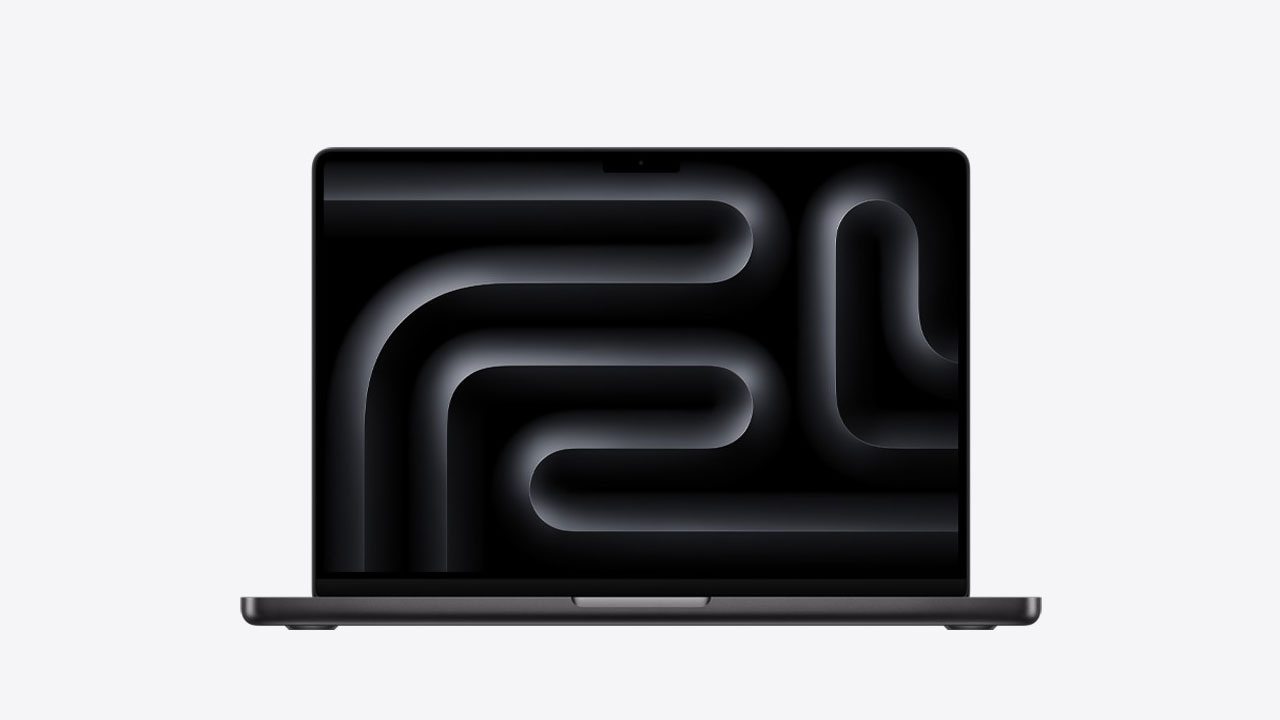
The Liquid Retina XDR display continues to be a major flex from Apple. It’s super bright, very color-accurate, and has the kind of contrast that makes creative work feel way more precise. If you’re a designer, photographer, or filmmaker, this display literally shows you details that other laptops just can’t.
Port selection is pretty decent too, you get Thunderbolt ports, HDMI, and an SD card slot, which gives you enough flexibility to plug in monitors, SSDs, and cameras without living the dongle life.
Apple also upgraded the thermal system in the new MacBook Pro to make sure it stays cool and consistent even when you’re running multiple heavy apps at once. No random throttling, no weird heat spikes, just stable performance the whole time.
Security is Bulletproof in the MacBook Pro. With features like the Secure Enclave, Touch ID, encrypted storage, and Apple’s locked-down OS environment, this laptop is a safe pick for anyone working on confidential projects or sensitive client work.
Overall, the MacBook Pro (M5) is a creative professional’s dream machine, powerful, built like a tank, optimized to perfection, and paired with one of the best displays you can get on any laptop. Yes, it’s expensive (like… very expensive), but the performance and reliability absolutely justify it for pros who need the best of the best.
13. Lenovo Thinkpad P16 Gen 2 – Best Workstation/Content Creation Laptop for Windows

Pros
- Extremely Powerful
- Durable Build Quality
- Bright OLED display with good color accuracy
- Plenty of connectivity options
- Good Keyboard
Cons
- Battery Life
- ridiculously expensive
- heavyweight
Well, if you don’t like Apple’s software experience and workflow of their software, We have also picked out the best Windows workstation laptop – Lenovo Thinkpad P16 Gen 2.
Lenovo ThinkPad P16 Gen 2 is equipped with different powerful Intel or AMD processors, which have high core counts and high clock speeds, suitable for demanding professional applications.
It can also be configured with NVIDIA RTX A-series GPUs, which are excellent for tasks that require substantial graphical power, such as 3D rendering, CAD, and machine learning. So, here you have much more flexibility over your hardware choice compared to the Apple MacBook Pro.
It comes with 4K UHD and OLED panels with excellent color accuracy and brightness. These options are perfect for professionals who require high-quality displays for tasks such as video editing, graphic design, and detailed visual work.
In General, the Lenovo Thinkpad P16 Gen 2 can easily go head-to-head with the Apple MacBook Pro, and it will be the perfect workstation laptop for Windows users.
14. Dell XPS 13 (9345) – Best Battery Life

Pros
- Exceptional battery life
- Premium lightweight design
- Bright and sharp display
- Smooth day-to-day performance
- Great keyboard and touchpad
Cons
- Limited ports
When it comes to ultraportable laptops, battery life is one of the biggest flexes. If you’re someone who works on the go, hops between classes, spends long hours traveling, or just hates carrying chargers everywhere, then this is the category you’ll care about the most.
The Dell XPS 13 (9345) is all about extreme battery efficiency. It’s designed with a strong focus on endurance, letting you push through full days of work, streaming, writing, researching, and browsing without constantly watching your battery percentage like a hawk. For an ultrathin laptop, this kind of battery life is unbelievable.
It comes with a 13.4-inch FHD+ or 3K display, and both versions look crisp and vibrant. The brightness is solid, colors are accurate, and whether you’re binge-watching shows or working on documents, the display stays sharp and easy on the eyes.
Powered by the latest Intel Core Ultra processors, the XPS 13 (9345) handles everyday tasks effortlessly, multitasking, office work, video calls, light editing, and all your usual apps run smoothly with zero issues. It’s not made for heavy gaming or 3D workloads, but for productivity and everyday use, it’s perfect.
The design continues that classic XPS vibe: sleek, minimal, compact, and premium. It’s one of those laptops that feels high-end the moment you pick it up. The build quality is sturdy, the keyboard feels great for long typing sessions, and the touchpad is smooth and responsive.
Port selection is where the Dell XPS stays minimal; you get two USB-C Thunderbolt ports, and that’s about it. It’s not ideal, but this is the trade-off you make with ultra-thin, battery-focused designs. At least Dell includes a USB-C dongle in the box.
Battery life is the real standout feature. Depending on the display option and workload, the XPS 13 (9345) can last 13–18 hours, making it one of the longest-lasting Windows laptops you can buy. If all-day battery life matters to you, this laptop is basically built for your lifestyle.
Overall, the Dell XPS 13 (9345) is a fantastic choice for anyone who values a lightweight premium design with industry-leading battery life. If you want a laptop you can carry everywhere without worrying about charging, this should be at the very top of your list.
15. Lenovo Yoga Book 9i – Best Dual screen
Pros
- Innovative Design
- Two gorgeous OLED touchscreen Displays
- Good Performance
- Lots of different usage cases
- Lightweight
- Surprisingly long battery life
- Good webcam and speakers
Cons
- Expensive
- The virtual touchpad isn’t smooth enough
There aren’t that many dual-screen laptops out there, but this one is a really interesting one. So, we decided to add it to the list.
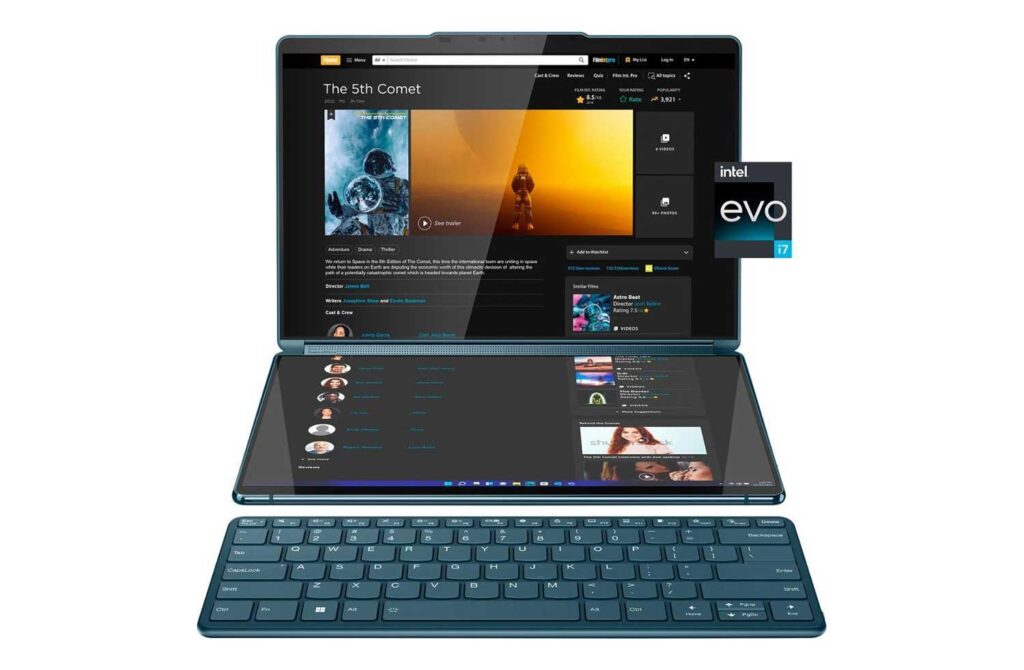
The Yoga Book 9i features two 13.3-inch OLED screens with a resolution of 2.8K. You can use them in several different ways.
Book mode is ideal for reading or referencing multiple documents simultaneously. Folded flat, it functions as a tablet, providing a large touchscreen surface for drawing or note-taking.
With the virtual keyboard on the bottom screen, it can be used as a traditional laptop.
The screens can also be extended vertically or horizontally to create a larger workspace, perfect for multitasking.
The Yoga Book 9i is powered by 13th Gen Core i7-1355U, providing good performance for a wide range of tasks, from everyday productivity to more demanding creative applications. It comes with integrated Intel Iris Xe graphics, which are good for light to moderate graphic design, video editing, and casual gaming.
Despite the dual screens, Yoga Book 9i maintains a relatively thin and lightweight profile and offers decent battery life. You can expect several hours of usage on a single charge.
Lenovo also includes software enhancements to take advantage of the dual-screen functionality, such as seamless window management and multi-screen productivity tools.
The Lenovo Yoga Book 9i is quite an innovative laptop that can fulfill your several different needs and could be really fun to use.
Final Words
This list ends here. We have tried to add the best laptop for each category. However, if we missed any laptop category, do let us know. We will try to keep this list updated, so be sure to check it out once in a while for a new update.