WARDOGS Twitch Drops are a great way to earn free in-game rewards simply by watching eligible streams.
If you’re looking to grab some extra loot without spending money, here’s how to link your accounts, find participating streamers, and claim your rewards.
WARDOGS Twitch Drops: All Rewards and Requirements
The current WARDOGS Twitch Drops campaigns include an Early Access 0.1 watch-time track and a separate campaign offering Twitch chat badges. The listed campaigns run through September 30, 2026.
Early Access 0.1 rewards
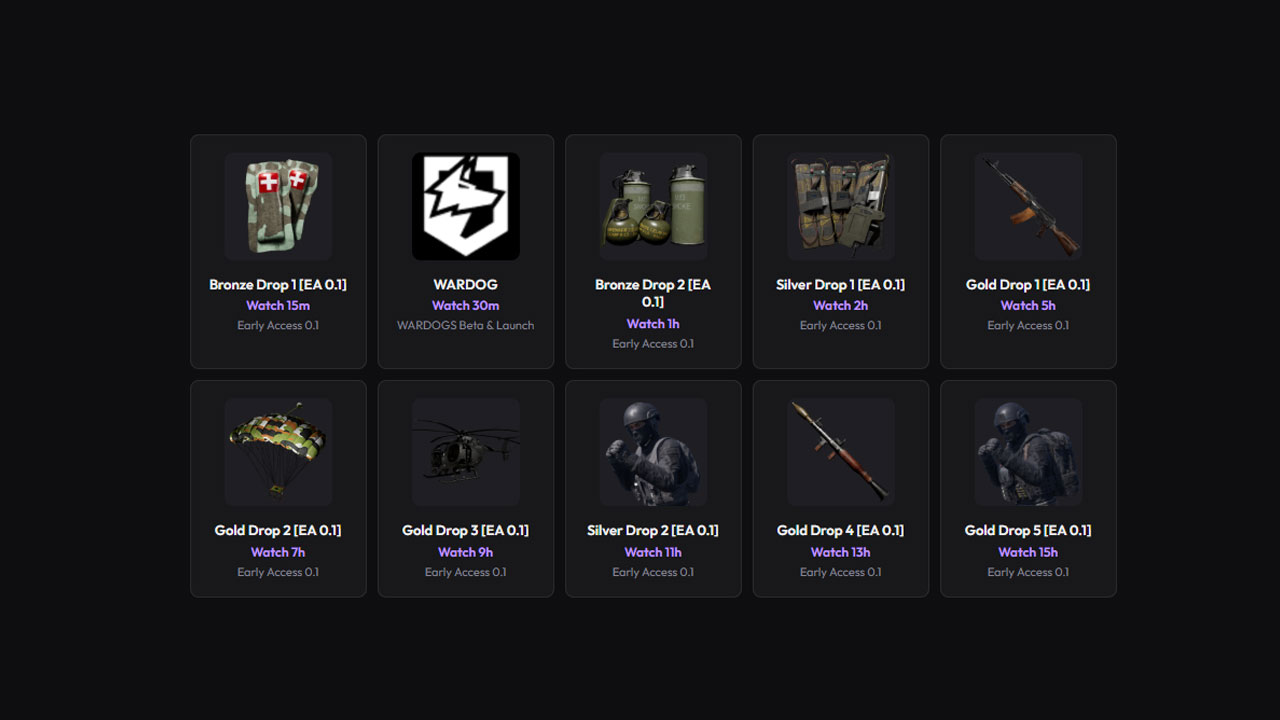
The WARDOGS Early Access 0.1 Twitch Drops campaign features nine in-game rewards, including weapons, equipment, and tactical gear. You can unlock them by watching eligible WARDOGS streams for the required amount of time.
| Reward | Watch Time |
|---|---|
| Bronze Drop 1 – Medical Pouch | 15 minutes |
| Bronze Drop 2 – Grenades | 1 hour |
| Silver Drop 1 – Tactical Vest | 2 hours |
| Gold Drop 1 – Assault Rifle | 5 hours |
| Gold Drop 2 – Parachute | 7 hours |
| Gold Drop 3 – Drone | 9 hours |
| Silver Drop 2 – Soldier Equipment | 11 hours |
| Gold Drop 4 – RPG | 13 hours |
| Gold Drop 5 – Soldier Equipment | 15 hours |
These are cumulative milestones, so you can work through the reward track by continuing to watch eligible WARDOGS streams.
WARDOG and WARLORD Twitch badges
There are also two separate Twitch badge rewards associated with the WARDOGS Beta & Launch campaign.
| Badge | How to unlock |
|---|---|
| WARDOG | Watch WARDOGS for 30 minutes on an eligible stream. |
| WARLORD | Purchase one qualifying new or gift subscription. Prime subscriptions do not count. |
The badges are Twitch chat rewards, not the same as the in-game Early Access 0.1 Drops.
How To Get WARDOGS Twitch Drops
Follow these steps to earn the rewards.
1. Link your WARDOGS and Twitch accounts
Before watching streams, connect the accounts you use to play WARDOGS and access Twitch Drops.
- Visit the official WARDOGS website
- Sign in with your Steam account through the game’s account system
- Open your player dashboard and look for the option to link your Twitch account
- Authorize the connection
The account-linking process is used for the game’s beta Drops campaign. Check the current campaign instructions before watching to ensure your accounts are connected correctly.
2. Find an eligible WARDOGS stream
Open WARDOGS on Twitch and choose a live stream participating in the Drops campaign.
Look for the Drops Enabled label or an equivalent campaign indicator. Watching a stream without an active Drops campaign will not necessarily earn progress.
3. Watch for the required time
Once you’re watching an eligible stream, your viewing progress should count toward the available rewards.
For the Early Access 0.1 campaign, the first milestone requires 15 minutes, while the final listed milestone requires 15 hours. You can track the reward requirements in Twitch’s Drops & Rewards section.
4. Claim your rewards on Twitch
Watching the required amount of time is not the final step. You must claim completed Drops through Twitch.
- Open Twitch Drops & Rewards and visit your Twitch inventory
- Find the completed WARDOGS Drop and look for the reward marked ready to claim.
- Select Claim and repeat this for each completed reward.
5. Find your rewards in WARDOGS
After claiming a reward, allow some time for it to reach your linked WARDOGS account. If the reward doesn’t appear immediately, restart the game and check your account again.
How To Find Twitch Drops in the WARDOGS Vault
If you have claimed an in-game reward but cannot find it in your loadout, check the Vault.
Claimed items can be accessed through the Vault icon in the main menu. When purchasing or selecting a kit, you may need to enable the Vault option to see your earned items instead of purchasing them again.
WARDOGS Twitch Drops Not Showing Up?
If your rewards aren’t appearing, try these troubleshooting steps:
- Confirm the reward is marked as claimed, not just earned.
- Make sure Twitch is connected to the correct WARDOGS account.
- Restart the game. This can help refresh your available rewards.
- Look for claimed items in the game’s Vault rather than only in the standard store or loadout menu.
If the reward is claimed on Twitch but still missing in-game, the issue may be related to reward delivery rather than your watch time.
Frequently Asked Questions
Do I need to watch a specific WARDOGS streamer?
The current campaign listings indicate that you can watch eligible WARDOGS streams rather than being restricted to one particular creator. Always verify that the stream is participating in the campaign.
Can I earn all the WARDOGS Twitch Drops?
Yes, the Early Access 0.1 reward track lists nine watch-time milestones, ranging from 15 minutes to 15 hours. You must complete the required watch time and claim each reward.
Do Twitch Drops give me free access to WARDOGS?
Twitch Drops and game access are separate. A reward campaign does not replace the requirements for owning or accessing the game.
When does the current campaign end?
The listed WARDOGS Twitch Drops campaigns are scheduled to run through September 30, 2026. Check Twitch’s campaign page for the current deadline and any updates.